Analysis Component
Note
Source : /src/kicadtoNgspice/Analysis.py
- class kicadtoNgspice.Analysis.Analysis(*args: Any, **kwargs: Any)
This class create Analysis Tab in KicadtoNgspice Window. 4 sections - - Select Analysis Type - AC Analysis - DC Analysis - Transient Analysis
Set various track widget options here, for tracking purposes across different functions and modules - - AC_entry_var - AC_Parameter - DC_entry_var - DC_Parameter - TRAN_entry_var - TRAN_Parameter - set_Checkbox - AC_type - op_check
- createACgroup()
Designing of AC group in analysis tab
3 radio buttons - Lin | Dec | Oct
3 input boxes, with top 2 combos
If previous values exist then fill default values from previous value xml file
- createAnalysisWidget()
Create the main anaylsis widget overwiew: - Checkbox for analysis type - Place, AC, DC and TRANSIENT analysis tab - self.acbox, self.dcbox, self.trbox…
Check for analysis file, if any in projDir, extract data from it
Else set the default checkbox to TRAN
Accordingly set state for track widget options, as TRAN, AC …
- createCheckBox()
Create the checkboxes for analysis type, under analysis tab
checkbox > checkgrid > checkgroupbtn > checkAC | checkDC | checkTRAN
Trigger enableBox on clicking
- createDCgroup()
Create DC area under analysis tab
- Source 1 and 2, each having 4 input boxes as follows
Source
Start
Increment
Stop
The last 3 have combo box pertaining to their unit as well
Also in the end a checkbox, for operating system point analysis
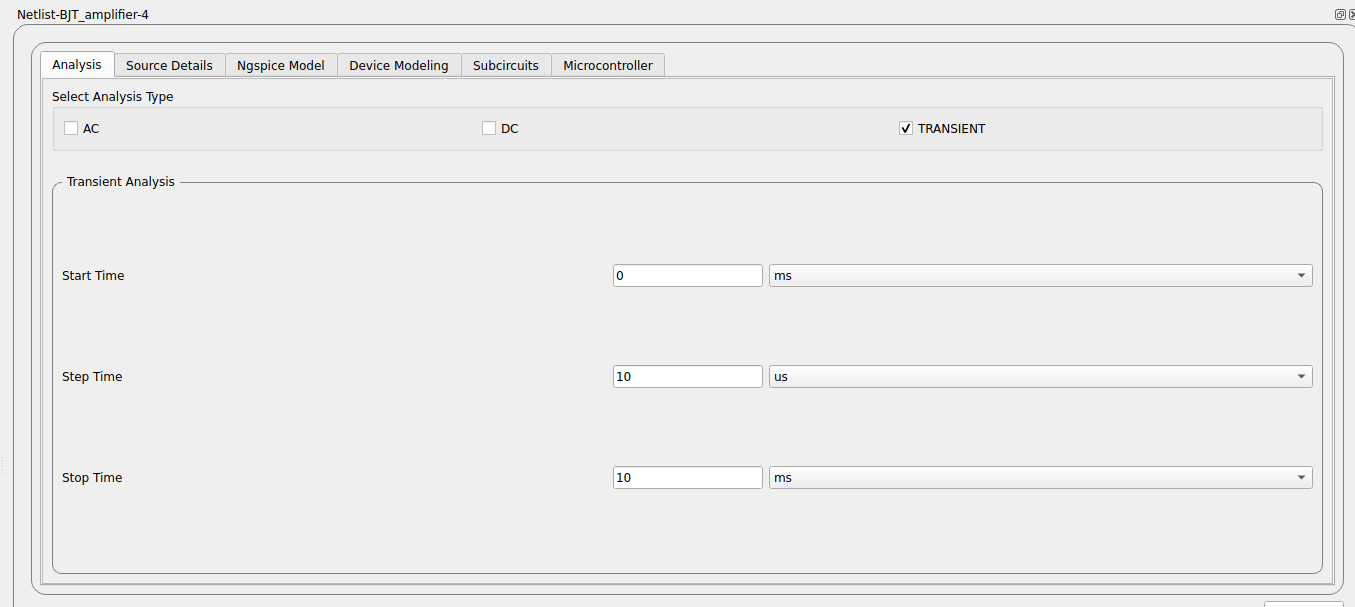
- createTRANgroup()
Creating transient group under analysis and creating it’s components
Contains 3 inout and combo boxes for -
Start time
Step time
Stop time
Input boxes for values, combo boxes for unit
Accordingly also event handlers for combo boxes, creates 3 functions
- enableBox()
Activate analysis areas according to checkBox marked
Add analysis data to track_obj from TrackWidget
- increment_changecombo(text)
Handle increment combo box, ie. units, as mV, V…
- increment_changecombo2(text)
Handle second increment combo box, ie. units, as mV, V…
- set_ac_type()
Sets track object for AC, according to the type of radio box selected.
- setflag()
Handles the Operating point analysis checkbox
- start_changecombo(text)
Handle start combo box, ie. units, as mV, V…
- start_changecombo2(text)
Handle second start combo box, ie. units, as mV, V…
- start_combo_change(text)
Handle start combo box, ie. units, as second, ms
- start_combovalue(text)
Handle start_fre_combo box event
Check where it is Hz, MHz, etc.
Accordingly set ac_parameter
- step_combo_change(text)
Handle step combo box, ie. units, as second, ms…
- stop_changecombo(text)
Handle stop combo box, ie. units, as mV, V…
- stop_changecombo2(text)
Handle second stop combo box, ie. units, as mV, V…
- stop_combo_change(text)
Handle stop combo box, ie. units, as second, ms…
- stop_combovalue(text)
Handle stop_fre_combo box event
Check where it is Hz, MHz, etc.
Accordingly set ac_parameter